Dyson 360 Vis Nav Review
Powerful Suction Meets Frustrating Navigation
Katie Armstrong
February 15, 2026 · 5 min read
The Dyson 360 Vis Nav represents Dyson’s third attempt at cracking the robot vacuum market, and it arrives with the company’s signature philosophy: focus on core vacuuming performance above all else. With 65 air watts of suction, a full-width brush bar, and innovative edge-cleaning technology, it delivers genuinely impressive dirt pickup. But exceptional suction doesn’t translate to a great robot vacuum when the navigation system frustrates daily use and the battery barely lasts an hour.
At $1,200, the 360 Vis Nav costs as much as comprehensive cleaning stations from Roborock and Dreame that include mopping, auto-emptying, and superior navigation. Dyson’s bet is that pure vacuuming power justifies the premium. After weeks of testing, that bet doesn’t pay off for most homes.
What Makes the Dyson 360 Vis Nav Different
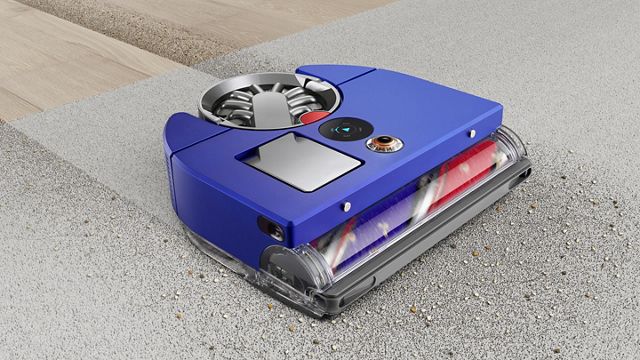
The 360 Vis Nav breaks from robot vacuum conventions in several ways. Its D-shaped body aims to reach corners better than circular designs. The full-width brush bar spans 11.8 inches—significantly wider than competitors—covering more floor per pass. Instead of side brushes, Dyson uses an extending side duct that redirects suction to edges.
The triple-action brush bar combines three bristle types: soft nylon for large debris on hard floors, anti-static carbon fiber filaments for fine dust, and stiff nylon for carpet agitation. This hybrid design delivers strong pickup across surface types without needing brush changes or adjustments.
Navigation relies on a 360-degree fisheye camera atop the robot combined with 26 sensors. An LED ring illuminates dark spaces under furniture. Dyson chose camera-based vSLAM navigation over LiDAR, following the same approach as their previous 360 Heurist model.
The robot stands 3.9 inches tall with a 0.5-liter dustbin—larger than many competitors. A washable HEPA filter provides whole-machine filtration. The charging dock is notably compact compared to elaborate cleaning stations.
Suction Performance: The One Clear Win
Dyson claims 2x the suction of any robot vacuum, and the 360 Vis Nav backs up that claim. At 65 air watts with 22,000Pa pressure, it genuinely outperforms competitors in raw pickup ability. Testing with cereal, rice, and pet hair on both hard floors and carpets showed impressive results—the robot devoured debris that other models struggled with.
On thick rugs where many robots bog down, the 360 Vis Nav powered through without hesitation. The wide brush bar maintained consistent contact, and the motor never struggled even on maximum pile height. Running it after competitors revealed how much fine dust other robots miss.
The triple-action brush design works as advertised. Carbon fiber filaments captured fine particles on hardwood that typically escape robot vacuums. Stiff bristles agitated carpet fibers effectively. The soft roller prevented larger items from scattering.
Edge cleaning via the extending side duct proved surprisingly effective. When the robot detected a wall, the duct extended automatically and redirected suction to capture debris right at the baseboard. While not quite as thorough as a good side brush, it performed better than expected.
The piezo sensor that detects dirt levels and automatically increases suction actually works. You can watch the power mode change in real-time as the robot encounters dirtier areas. The resulting dust map in the app shows where your home collects the most debris.
For pure vacuuming capability, the 360 Vis Nav genuinely excels. If dirt pickup were the only consideration, this would be an easy recommendation.
Navigation: Where Everything Falls Apart
Unfortunately, dirt pickup isn’t the only consideration. The 360 Vis Nav’s camera-based navigation system undermines its cleaning prowess with inconsistent, inefficient, and sometimes baffling behavior.
Initial mapping takes significantly longer than LiDAR competitors. Where the Roborock Q7 Max+ maps a home in 20-30 minutes with logical, methodical paths, the 360 Vis Nav wanders seemingly aimlessly for over an hour, repeatedly visiting the same areas while missing others entirely.
The resulting map often contains errors—rooms misidentified, boundaries incorrectly drawn, and areas that don’t match actual floor layout. The app doesn’t allow the robot to refine maps over time. To fix mapping errors, you must delete everything and remap from scratch, which means another hour-plus session.
During regular cleaning, the robot frequently exhibits confusing behavior. It might clean the same spot three times in one session while completely skipping an adjacent area. Cleaning patterns don’t follow the logical rows you see with LiDAR navigation. Instead, the robot moves in seemingly random patterns that somehow cover most (but not all) of the floor.
Obstacle detection proves inconsistent. The 360 Vis Nav navigates well around large furniture like couches and dining tables. But it struggles with narrow passages, chair legs, and smaller obstacles. The camera needs time to process what it sees, leading to multiple approach attempts at tight spaces before either navigating through or giving up.
Some users report the robot repeatedly bumping the same furniture, getting “lost” mid-clean, or failing to return to the dock. In testing, return-to-dock worked reliably, but cleaning efficiency varied wildly between sessions. One day it might clean methodically; the next day it wanders erratically.
The lack of real-time cleaning path visualization in the app means you can’t see what the robot is actually doing until it finishes. LiDAR robots show their exact position and cleaning lines as they work—helpful for understanding stuck robots or skipped areas. The 360 Vis Nav just shows a heat map after the fact.
Compared to any LiDAR-equipped robot in the same price range, the navigation is demonstrably inferior. Seven years in development, and Dyson still hasn’t matched navigation systems that became standard in $400 robots.
Battery Life: Barely Adequate
The 360 Vis Nav provides up to 65 minutes of runtime—on the lowest power setting. That’s already below average for a $1,200 robot. In Auto mode (which you’ll actually use), expect 45-55 minutes depending on floor type and dirt levels. In Boost mode, runtime drops below 30 minutes.
For a 1,000-1,500 square foot home, 65 minutes suffices for a complete cleaning if navigation is efficient. Given the wandering cleaning patterns described above, the robot often can’t finish even modest-sized homes on a single charge.
It does support recharge-and-resume, returning to the dock when battery runs low and continuing where it left off. But the charging time is brutal: 165 minutes to fully recharge from empty. That’s nearly three hours waiting for the robot to resume a partially completed job.
The math is frustrating. The robot runs for 65 minutes maximum, but needs 165 minutes to recharge. For homes requiring multiple charges, total cleaning time extends to 3+ hours with the robot sitting idle most of that time. The Dreame L10s Ultra Gen 2 cleans the same space in under 90 minutes with superior navigation.
Dyson’s focus on maximum suction power created the battery compromise. The Hyperdymium motor spinning at 110,000 RPM demands significant power. You get incredible pickup, but only for 45-65 minutes before retreating to charge for hours.
Reliability and Software Concerns
User reports reveal concerning reliability patterns. Multiple owners describe robots that work well initially but develop navigation problems after firmware updates. Common complaints include the robot getting stuck on nothing, reporting false “lifted” errors, failing to return to the dock, or stopping mid-clean with sensor obstruction warnings.
The drop sensors and vision sensors require frequent cleaning—ironic for a vacuum whose purpose is handling dust. Some users report sensor obstruction errors when sensors look visibly clean, requiring careful wiping to restore function.
The MyDyson app provides basic functionality but lacks features common in competing apps. You can’t zoom the map when setting room dividers, making precise placement difficult. The robot doesn’t continuously refine maps as it cleans. Editing any map element requires complete remapping.
Some users report never completing a single cleaning session without the robot getting stuck, lost, or failing to dock. While not universal, the frequency of these complaints exceeds what you see with established LiDAR robots from Roborock, Dreame, or Ecovacs.
Software updates haven’t consistently improved the situation. Some users report degraded performance after updates, suggesting Dyson hasn’t fully sorted the navigation algorithms even a year after launch.
What’s Missing at This Price Point
At $1,200, the 360 Vis Nav competes with feature-complete flagships. Here’s what you don’t get:
No self-emptying. You must manually empty the dustbin every 2-5 cleaning sessions depending on home size and debris. The 0.5-liter capacity is decent, but competitors at this price offer 30-60 day auto-empty stations. Dyson argues self-empty bags create waste and expense, but many users prefer that tradeoff.
No mopping. Vacuum only. Fine if you don’t need mopping, but most $1,000+ robots offer it. The Ecovacs Deebot X8 Pro Omni at a similar price vacuums, mops, and self-empties.
No advanced obstacle avoidance. The camera detects objects but can’t identify specific items like cables, shoes, or pet waste. It doesn’t match the AI-powered obstacle recognition in premium competitors.
Limited app features. No live camera view, no object recognition reports, no automatic map refinement, basic scheduling only.
Dyson deliberately chose a “vacuum purist” approach, believing users would value exceptional suction over feature bloat. That philosophy works for their cordless stick vacuums. For robots, where autonomy and reliability matter as much as cleaning power, the stripped-down approach feels incomplete.
The D-Shaped Design: Clever But Compromised
The D-shaped body theoretically improves corner access compared to circular robots. In practice, benefits are modest. The straight edge allows the robot to get closer to walls along one side, but corners still aren’t perfectly cleaned because the brush bar doesn’t extend to the absolute edge.
The shape does allow the wider brush bar, which genuinely covers more floor per pass. But inefficient navigation patterns negate this advantage—what’s the point of a wider brush if the robot cleans the same spot three times while missing others?
The D-shape makes the robot slightly more maneuverable in tight spaces compared to circular designs of similar width. At 12.6 inches wide, it fits through standard doorways easily and navigates around furniture legs reasonably well (when the vision system cooperates).
Maintenance and Usability
The 360 Vis Nav scores well for hands-on maintenance. The dustbin detaches easily with Dyson’s signature one-touch ejection mechanism—push the button, the bottom opens, and debris drops into your trash. No dust clouds, no touching dirt.
The HEPA filter is washable and doesn’t require replacements, saving ongoing costs. Rinse it monthly, let it dry completely, and reinstall. Dyson claims it lasts the life of the machine.
The brush bar’s wide diameter and triple-action design actually resist hair tangling better than expected. Hair wraps around the bar but doesn’t create the massive tangles common on smaller brushes. Maintenance cleaning every few weeks keeps it working properly.
The onboard LCD screen provides basic control without the app—select cleaning mode, start/stop, view battery level, and check error messages. Helpful when your phone isn’t handy.
Setup through the MyDyson app takes under 10 minutes. Connection to WiFi is straightforward. The app sends 10-minute advance warnings before scheduled cleanings—a thoughtful detail missing from most competitors.
Physical build quality feels premium. Materials are robust, components fit tightly, and the overall construction inspires confidence it’ll survive years of bumping into furniture.
Noise Levels: Louder Than Advertised
Despite Dyson’s “quiet mode,” the 360 Vis Nav runs noticeably louder than most robot vacuums. That powerful motor creates substantial noise, especially in Auto and Boost modes. Multiple reviews cite excessive noise as a complaint.
Forget running it overnight unless you sleep through anything. The combination of motor noise and the bright LED navigation ring makes nighttime operation impractical. LiDAR competitors with infrared navigation run quieter and don’t light up dark rooms.
In Quiet mode, noise is acceptable but still audible from adjacent rooms. In Boost mode, it’s genuinely loud—comparable to a traditional upright vacuum.
Performance on Different Floor Types
Hard floors: Exceptional. The soft roller captures everything from fine dust to cereal without scattering. The wide brush covers significant area quickly. Edge cleaning reaches impressively close to baseboards.
Low-pile carpet: Excellent. Stiff bristles agitate effectively, and powerful suction lifts embedded dirt. The wide brush bar prevents the bogging down common with less powerful robots.
Medium-pile carpet: Very good. The dual-link suspension maintains brush contact, and suction power handles the density well. Some users report it struggles with thick pile transitions, pushing rug edges rather than climbing over them.
Pet hair: Outstanding. The combination of brush design and suction power handles even heavy shedding. Hair wraps around the brush but doesn’t create debilitating tangles. Owners of multiple shedding pets report excellent results.
Mixed flooring: The robot handles transitions adequately but sometimes struggles with thick rug edges. It may try multiple times to climb onto a rug before giving up and moving on. Low-profile transitions work fine.
Who Should (and Shouldn’t) Buy This
Consider the 360 Vis Nav if you:
- Have mostly hard floors and low-pile carpet
- Prioritize maximum suction over navigation efficiency
- Don’t mind shorter battery life and longer charge times
- Prefer manual dustbin emptying over auto-empty expense
- Value Dyson’s brand reputation and build quality
- Have a smaller home under 1,200 square feet
- Don’t need mopping functionality
Skip it if you:
- Have a larger home requiring efficient navigation
- Want reliable, predictable cleaning patterns
- Need long battery life or quick recharging
- Expect self-emptying at this price point
- Prefer LiDAR navigation’s precision
- Want comprehensive smart features
- Need guaranteed reliability without quirks
The Competition at This Price
At $1,200, you’re choosing between very different philosophies:
The Roborock Qrevo Curv costs slightly more but includes mopping, auto-empty, hot water mop washing, obstacle avoidance, and superior LiDAR navigation. Less raw suction than the Dyson, but better overall execution.
The Shark PowerDetect NeverTouch Pro at $800 delivers 90% of the cleaning performance with self-empty and better navigation. Save $400 for nearly equivalent results.
For pure vacuuming obsessives, the iRobot Roomba s9+ offers comparable suction with better navigation and self-emptying for roughly the same money. Also D-shaped, but with LiDAR navigation.
If you specifically want Dyson technology, consider their cordless stick vacuums instead. A Dyson V15 Detect ($750) gives you the same powerful motor and intelligent dirt detection in a manual form that you fully control.
The Verdict
The Dyson 360 Vis Nav feels like a robot designed by vacuum engineers who’ve never used a robot vacuum. The suction is genuinely impressive—likely the strongest available in a robot. The build quality is excellent. The edge-cleaning innovation works better than expected. For pure dirt pickup, it competes with anything on the market.
But a robot vacuum needs to be more than powerful. It needs to navigate efficiently, clean reliably, and operate autonomously without constant intervention. The 360 Vis Nav stumbles on all three counts.
Camera-based navigation hasn’t improved meaningfully from Dyson’s previous attempt seven years ago. Competitors perfected LiDAR navigation in that time, making the Vis Nav’s wandering patterns and mapping struggles feel outdated. Battery life barely suffices for modest homes and requires frustratingly long recharge times. Software reliability concerns suggest Dyson hasn’t fully sorted the autonomous operation.
At $600-700, the 360 Vis Nav’s trade-offs might be acceptable. At $1,200, you should expect better. For this money, the Dreame L10s Ultra Gen 2 or Ecovacs Deebot X8 Pro Omni deliver more complete solutions with superior navigation, comparable cleaning performance, and comprehensive features.
The 360 Vis Nav will appeal to Dyson enthusiasts who trust the brand and prioritize suction above all else. For everyone else, better options exist at this price point. Dyson’s vacuum engineering expertise is undeniable, but translating that to successful autonomous robots requires more than powerful motors. It requires navigation systems that work consistently, battery life that supports whole-home cleaning, and software reliability that inspires confidence.
This robot isn’t bad—the suction genuinely impresses, and build quality is excellent. But it’s incomplete. And at $1,200, incomplete isn’t good enough.
Pros
- + Exceptional suction power (65 air watts, 22,000Pa) genuinely outperforms competitors
- + Triple-action brush bar delivers excellent pickup on all floor types
- + Innovative extending side duct provides better-than-expected edge cleaning
- + Washable HEPA filter eliminates replacement costs
- + Easy dustbin emptying with hygienic one-touch mechanism
- + Premium build quality and robust construction
- + Wide brush bar (11.8 inches) covers more floor per pass
- + Compact charging dock doesn't dominate floor space
Cons
- − Camera navigation is inconsistent, inefficient, and inferior to LiDAR competitors
- − Short battery life (45-65 minutes) with extremely long charging time (165 minutes)
- − Reliability concerns including navigation errors, false sensor alerts, and dock-finding failures
- − No self-emptying capability at $1,200 price point
- − No mopping functionality
- − Louder operation than competitors, especially in higher power modes
- − Limited app features with no real-time cleaning visualization
- − Struggles with thick rug transitions and sometimes gets stuck on nothing
Technical Specifications
Share this article